
Passwords Or Passphrases
Don’t reuse weak passwords! Learn whether you should use passwords or passphrases and how a password manager can simplify your security and protect your data.


Passwords & Passphrases
Password/Passphrase Basics
It is highly advisable that you DO NOT use the same password for multiple accounts.
One of the earliest computer security features was the password. Today we have passwords not only for our computers and phones, but for our email, bank, social media and other online accounts. The general rule is to make a password at least eight characters long, use upper and lower case letters, and use numbers and special characters.
Today the password has evolved….into a longer string of random, and not so random, characters called a passphrase. Watch Which Is Better Passwords And Passphrases for more.
Typically a passphrase is made up of four or more random words, numbers and special characters which can form a phrase. You can even include spaces. The idea is that this method is easier for you to remember and harder for cyber criminals to guess.
Cyber criminals can employ social engineering or brute force tactics to figure out your passwords and gain access to your online accounts or private information. Many people use very insecure, easy to guess passwords like birthdates, names, street addresses, etc.
Signing up with a password manager website that offers a password generator is an option if you don’t want to make your own passwords/phrases. There are multiple companies online providing this service.
How Does It Work
Choose a service that you feel is right for you. (often a free account is available offering fewer options, but you should have access to a password generator).
Make an account by setting a user-name and a password.
The password you sign in with will be your master password. This one password will give you access to all your other passwords. Be sure to keep a copy in a safe place.
After you login, you can start adding the websites you use, one by one, along with your usernames and passwords. Save each one as you go.
If you decide to use the password/phrase generator option, you will need to login into your accounts and change your old passwords to the newly generated passwords/phrases and save them. It is advisable to change the old passwords methodically, one by one, so you don’t make a mistake.
Using this method you only have one password to remember and that is the master password you will use to log-in to your password manager account. From this account you will launch the website you want to use and it should automatically populate your user-name and password/phrase, then just click “log-in”. (* NOTE: Depending on the service or web browser you use, you may have to launch the website you want to use and then copy and paste your user-name and password before you click “log-in”).
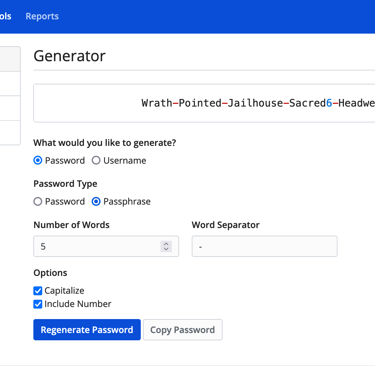
There are many password managers available on the market. In the example below we will look at the password generator and pass-phrase generator from Bitwarden.

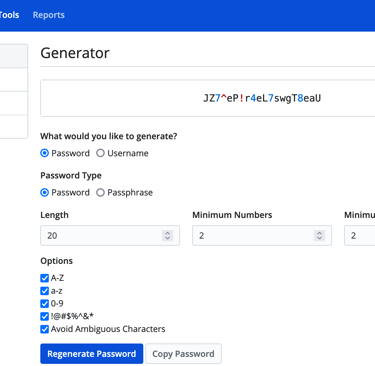

Password Generator
Passphrase Generator
As you can see in the first example below, it is pretty straight forward. First select the tool you would like to use, in this case Generator. In this example a password has been generated by selecting Password for both the Generate and Type fields. You can select the length of your password, and add numbers and special characters as well.
In the second example below the tool selected is, again, Generator. And Password is again selected. But this time we are going to generate a Passphrase, so in the Password Type section we choose Passphrase. We select the number of words, and choose to capitalize and include a number. This time the generator gives us a Passphrase instead of a Password.
Things To Remember
Password – General rule is minimum of 8 characters, include upper/lower case letters, numbers and special characters.
Passphrase – General rule is minimum of 4 words, include upper/lower case letters, numbers and special characters.
Password generator – Using this method enables you to use passwords/phrases that are randomly generated and more secure.
2FA – Two Factor Authentication is a good way to add another layer of security to your accounts.
Always keep a back-up of your passwords/phrases in a safe place.
Regardless of which method you choose keep in mind that the longer and more random a password/phrase is, the better.